Your CD spectrum is the starting point. The next step is understanding what it tells you about your sample, assessing the quality of the analysis, and sharing the results.
Nicoya’s new Analysis Workbench software brings data processing, visualization and advanced analysis into one Windows desktop application. Designed for Chirascan users, it introduces integrated Secondary Structure Decomposition (SSD), alongside thermal melt analysis, global kinetics and a refreshed workspace designed to make everyday analysis easier.
Explore protein secondary structure without leaving your workspace
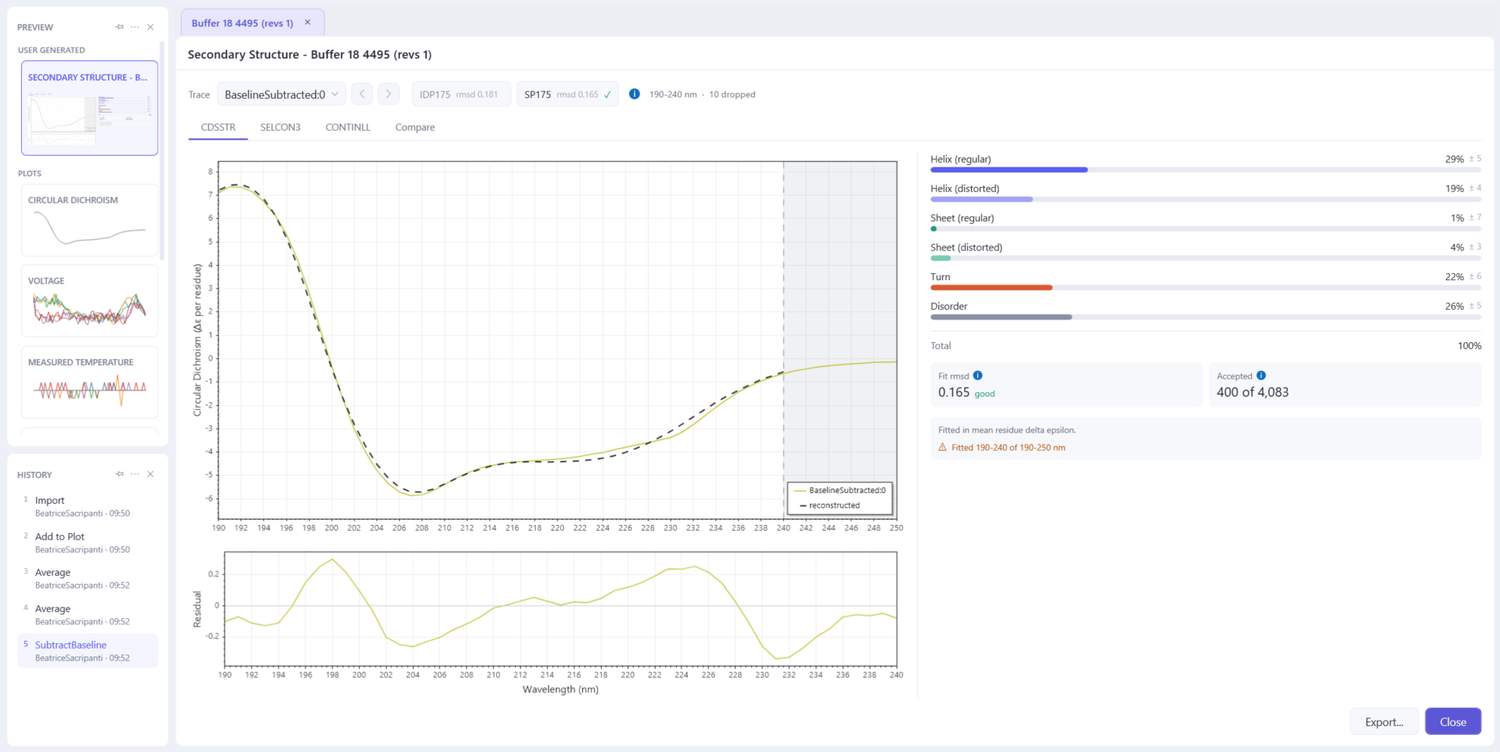
SSD estimates the proportions of helix, sheet, turn and disorder in a protein from its far-UV CD spectrum providing valuable insights into protein secondary structure and how it changes under different conditions or formulations.
With Analysis Workbench, you can now work directly with your spectra rather than moving your data to a separate analysis tool.
The software incorporates three published analysis methods: CDSSTR, SELCON3 and CONTINLL, using reference datasets covering both folded and intrinsically disordered proteins. Rather than simply reporting secondary structure percentages, it allows you to compare results across methods and evaluate the quality of each fit through reconstructed spectra, residuals, and fit-quality indicators. This added visibility helps you assess how much the result depends on the method and reference dataset and make more informed interpretations of protein secondary structure.
Make everyday CD analysis more straightforward
From preparing spectra to interpreting and sharing results, Analysis Workbench streamlines everyday CD analysis by bringing your data, processing tools, and results together in one workspace. Supporting Chirascan .dsx and .dsa files, the software makes it easier to:
- Prepare spectra: average traces, subtract baselines, smooth spectra, and convert units.
- Inspect your data: use previews, adjust plots, and compare data at different time intervals.
- Refine your analysis: preview processing changes and configure curve fits within the workspace.
- Share your findings: export processed data, analysis reports, and high-resolution figures.
- Keep analysis traceable: for regulated environment, offers audit-trail viewing and export, electronic signatures, and administrative controls to support 21 CFR Part 11 workflows.
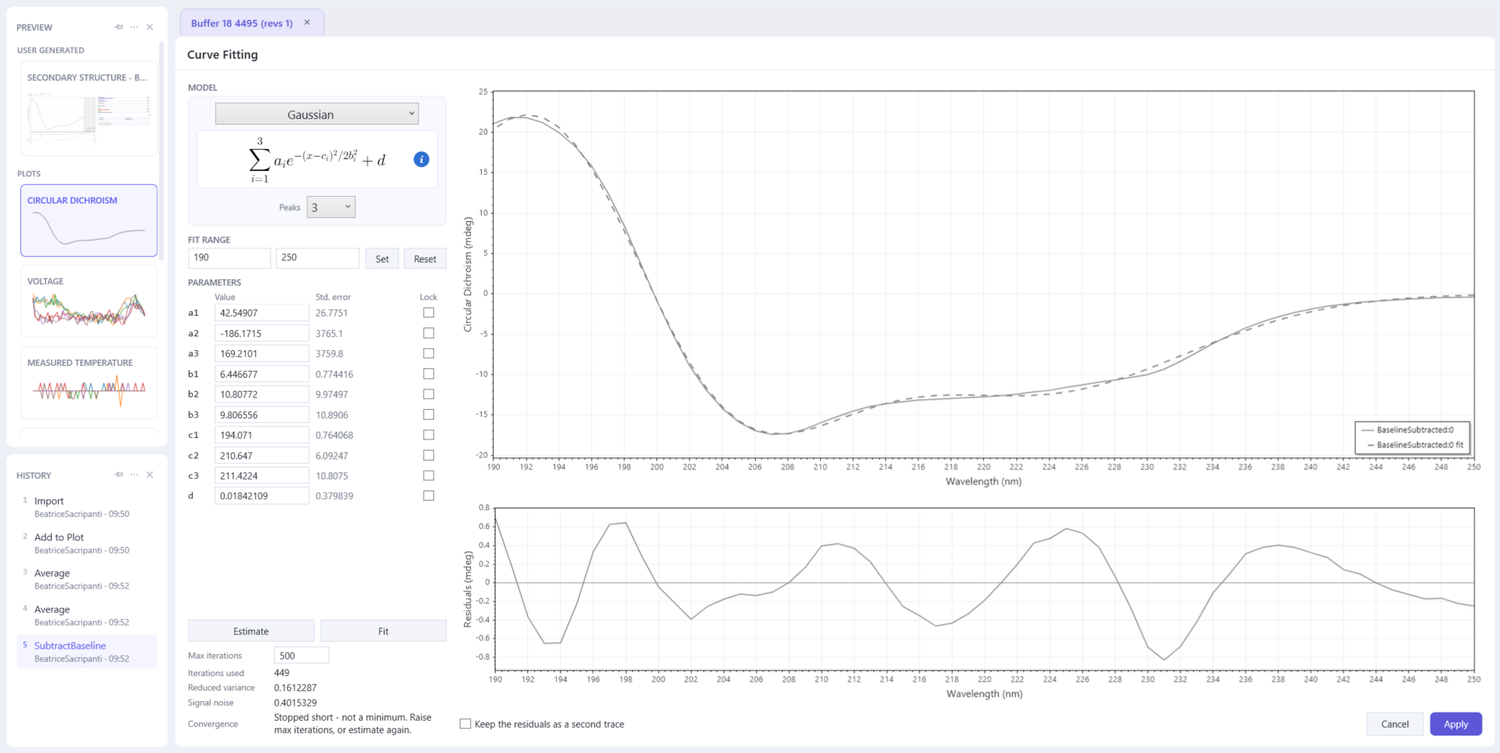
Each change is saved as a new step, allowing you to revisit earlier stages of your analysis without losing previous work. Results are also saved within the document, making it easier to retrace your workflow, review past experiments, and understand how conclusions were reached.
Go beyond a single spectrum
Analysis Workbench supports more than individual CD spectra, by bringing thermal stability and kinetic analysis into the same workspace.
With Thermal Melt analysis, you can fit temperature-ramp data to determine melting temperatures and model-dependent thermodynamic parameters. It also displays the spectra of the fitted species, helping you to examine structural changes alongside the thermal transition.
For supported stopped-flow datasets, Global Kinetics analysis enables you to fit reaction models across multiple timepoints and wavelengths. Together with SSD, these tools bring established CD analysis tasks into one integrated workspace.
More to come
Analysis Workbench will continue to evolve with new capabilities designed to streamline more complex analyses and workflows. Planned enhancements include higher-order structure (HOS) analysis and batch processing, alongside an API to support integration with other software tools. These developments aim to reduce manual data handling and make more complex analyses easier to manage, helping you get more from Chirascan data.